
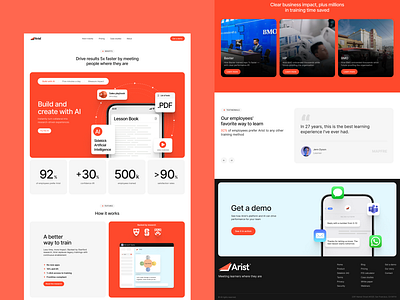
Dribbble Website Design: Inspiration, Ideas and Best Practice
Dribbble is a popular platform for discovering and sharing creative work, including website designs, user interfaces and digital products. For business owners, designers and developers, it can be a useful place to explore visual ideas, spot emerging trends and see how other creatives approach a design challenge.
However, a striking concept is only the starting point. Effective website design must do more than look good: it should help visitors understand a business, find what they need and take the next step.
What makes Dribbble useful for website design?
Dribbble’s design community offers a wide range of examples, from landing pages and online shops to dashboards and mobile experiences. Browsing this work can help teams:
- Explore different visual styles, layouts and colour palettes
- Find inspiration for navigation, buttons, forms and other interface elements
- See how typography and imagery can shape a brand’s personality
- Gather ideas to discuss with a designer or development team
Searches for specific industries or features can make discovery more focused. A business planning a new home page, for example, might look at examples from similar sectors while also exploring design approaches from outside its industry.
Look beyond the visuals
Many designs shared on Dribbble are presented as polished images or short animations. These can be excellent for exploring visual direction, but they may not show how a complete website works. A concept may not include every page, accessibility considerations, responsive behaviour, loading performance or the practical details of a content management system.
Before adopting an idea, consider how it would work for real visitors. Is the purpose of the page clear? Can users find key information easily? Do calls to action stand out without competing with one another? Would the design remain usable on a mobile screen?
Turning inspiration into a practical website
Dribbble works best as a source of reference rather than a blueprint. To turn inspiration into a useful website design, start with the needs of the business and its audience.
- Set clear goals. Decide what the website should help visitors do, such as make an enquiry, book a service or purchase a product.
- Understand the audience. Consider what information visitors need and what might prevent them from taking action.
- Choose relevant references. Save examples that solve a particular problem, not only designs that look attractive.
- Plan the content and structure. Organise pages and information so visitors can navigate the site with confidence.
- Test across devices. Check that layouts, text, images and interactive elements work well on desktop, tablet and mobile.
Design trends to explore
Dribbble can provide a snapshot of current creative directions. Depending on the project, visitors may encounter bold typography, generous white space, expressive colour, subtle motion, editorial layouts or simplified interfaces. These approaches can be useful, but trends should support the brand and the user experience rather than dictate them.
For example, animation may add personality or guide attention, but excessive movement can distract visitors. A minimal layout may feel refined, but it still needs clear navigation and enough information to answer users’ questions. Good design balances visual character with clarity and usability.
Accessibility and performance matter
A website should work for as many people as possible. Readable text, sufficient colour contrast, descriptive links, keyboard-friendly controls and meaningful image descriptions all contribute to a more accessible experience. These details are not always visible in a static design preview, so they should be considered during planning and development.
Performance is equally important. Large images, complex effects and unnecessary scripts can slow a site down. Optimising assets and keeping interactions purposeful can help create a smoother experience, particularly for visitors using mobile devices or slower connections.
Using Dribbble as part of the design process
Dribbble can help teams communicate ideas and build a shared visual direction. A collection of carefully chosen references can show a designer what feels appropriate, what should be avoided and which details matter most. The most useful references are accompanied by clear notes explaining what works about them—for example, the page structure, tone or way information is presented.
It is also important to respect the work of the original designers. Use examples for inspiration and discussion, rather than copying another creator’s design. A strong website should reflect the business’s own identity, audience and goals.
Conclusion
Dribbble is a valuable source of website design inspiration, offering a wealth of ideas for visual style and interface details. The best results come from looking beyond appearance and considering how each idea serves real users. By combining creative references with clear goals, accessible design and practical testing, businesses can create websites that are distinctive, useful and effective.
7 Benefits of Using Dribbble for Website Design
- Offers a wealth of creative inspiration.
- Showcases current design trends.
- Makes it easy to explore varied styles.
- Highlights polished visual concepts.
- Helps spark fresh ideas.
- Useful for building mood boards.
- Connects you with creative designers.
Limitations of Dribbble as a Source of Web Design Inspiration
- Designs may prioritise appearance over usability.
- Many concepts are not fully functional websites.
- Popular styles can make designs feel unoriginal.
- Some examples overlook accessibility and mobile needs.
Offers a wealth of creative inspiration.
Dribbble offers a wealth of creative inspiration for website design, bringing together work from designers across a wide range of industries and styles. Browsing its projects can spark ideas for layouts, colour palettes, typography, imagery and interactive details, helping businesses and design teams explore new possibilities. These examples are best used as a starting point, adapting the ideas to suit the brand, audience and purpose of the website rather than copying another designer’s work.
Showcases current design trends.
Dribbble is a useful place to discover current website design trends, with designers regularly sharing fresh ideas in layouts, typography, colour palettes, animations and user interfaces. Browsing this work can help businesses and creative teams see what is gaining momentum and find inspiration for their own projects. Rather than following every trend, it is worth choosing ideas that suit your brand and make the website clearer and more engaging for visitors.
Makes it easy to explore varied styles.
One of the main advantages of Dribbble for website design is how easy it makes it to explore a wide range of styles. Designers and businesses can browse everything from clean, minimalist layouts to bold, colourful concepts, helping them discover fresh ideas and identify visual approaches that suit their brand. This variety can also make it easier to compare different treatments of common features, such as navigation menus, landing pages and calls to action, before deciding on a direction for a project.
Highlights polished visual concepts.
Dribbble highlights polished visual concepts, making it easy to explore refined layouts, striking colour palettes and carefully considered interface details. These examples can spark ideas and help designers communicate a visual direction to clients and teams. While a polished concept may not show how a complete website performs in practice, it offers a valuable starting point for developing a distinctive design that meets real user needs.
Helps spark fresh ideas.
Dribbble can help spark fresh ideas by bringing together a wide range of creative approaches to websites, layouts, colours and typography. Browsing designers’ work can introduce you to styles and solutions you may not have considered, helping you find inspiration for a new project or rethink an existing design. Use these ideas as a starting point, adapting them to suit your brand, audience and website goals.
Useful for building mood boards.
Dribbble is a useful resource for building mood boards, helping designers gather visual references in one place and establish a clear creative direction for a website. By exploring examples of colour palettes, typography, layouts, imagery and interface details, teams can identify ideas that suit a brand and share them with clients or colleagues. These references make it easier to discuss the desired look and feel before design work begins, while leaving room to create an original result rather than simply copying existing designs.
Connects you with creative designers.
One of Dribbble’s biggest advantages is that it connects businesses with creative designers from around the world. You can browse portfolios, explore different styles and find professionals whose experience suits your project, whether you need a fresh website concept or a complete redesign. This makes it easier to discover talent, compare approaches and start conversations with designers who can help bring your ideas to life.
Designs may prioritise appearance over usability.
One potential drawback of Dribbble website design is that concepts may prioritise visual appeal over usability. A striking layout, bold typography or elaborate animation can look impressive in a portfolio, but may make a real website harder to navigate, slower to load or less accessible. Designs should therefore be assessed not only for how they look, but also for how clearly they guide visitors and perform across different devices.
Many concepts are not fully functional websites.
One drawback of using Dribbble for website design inspiration is that many projects are presented as polished concepts rather than fully functional websites. A design may look impressive in a static image, but it might not show how navigation, forms, animations or mobile layouts work in practice. Before using an idea, consider how it would perform across different devices and whether it supports the needs of real visitors.
Popular styles can make designs feel unoriginal.
One drawback of using Dribbble for website design inspiration is that popular styles can make different sites feel unoriginal. When designers repeatedly draw on the same trends, layouts and visual effects, websites can start to look alike and lose their distinctive character. To avoid this, use Dribbble as a starting point rather than a template, and adapt ideas to reflect the brand’s identity and the needs of its audience.
Some examples overlook accessibility and mobile needs.
One drawback of Dribbble website design is that some examples prioritise visual impact over accessibility and mobile usability. A design may look impressive on a large screen but rely on small text, low-contrast colours, intricate interactions or layouts that do not adapt well to phones. When using Dribbble for inspiration, treat these designs as starting points and check that your own website is readable, accessible and easy to use across different devices.
